Fiona (macOS App)
Your 1-Key App Switcher
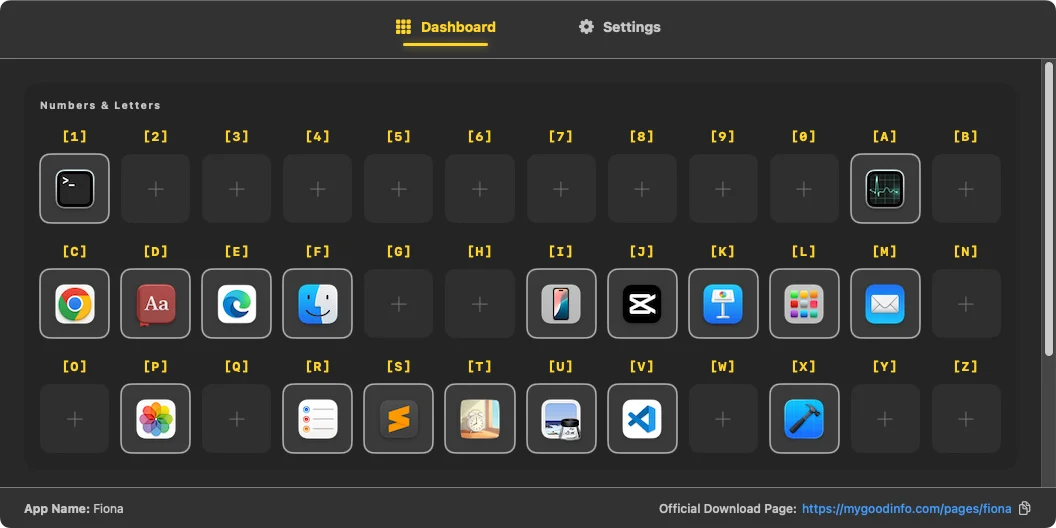
Intro
- App Name: Fiona
- Platform: macOS Only
-
Purpose:
Fiona lets you instantly open apps from your Applications folder
using a two-step keyboard shortcut. Press a trigger key, then select
an app with a single letter — no Dock, no searching.
Fn + F1 → S → opens Safari
Fn + F1 → M → opens Mail
Pricing Options
- Free Version: Use up to 5 customized hotkeys completely free.
- Pro Version: US$4.99 (One-time purchase).
Installation and Setup
Get Fiona up and running on your Mac in just a few simple steps:
-
Download and Install: Open the downloaded
.dmgfile and drag Fiona into your Applications folder. - Launch the App: Open Fiona directly from your Applications folder or Launchpad.
- Grant Permissions: When prompted, grant the required macOS Accessibility permissions so Fiona can detect your shortcuts globally.
How to Use Fiona
Fiona uses a two-step trigger system to let you switch apps instantly without taking your hands off the keyboard.
- The Global Trigger: By default, pressing Fn + F1 activates Fiona's overlay dashboard. You can customize this trigger key at any time from the Settings tab.
- Assigning Hotkeys: Navigate to the Dashboard tab, click on any empty hotkey slot, and select your desired application to map it.
-
Example Scenario: If you map the letter
S to Safari, your workflow becomes:
- Press Fn + F1 (Activates Fiona)
- Press S (Instantly opens or focuses Safari)
Terms and Conditions
Last Updated: 9th June 2026
By purchasing, downloading, or using Fiona, you agree to the following:
- License and Purchases: All transactions are securely processed through our Merchant of Record, Lemon Squeezy. Each purchase grants a non-transferable, non-exclusive license to install and use Fiona on your Mac devices.
- Refund Policy: All sales are final. Refunds are not available once a purchase has been completed.
- Software Provision: The software is provided "as is." While we may provide updates, improvements, or bug fixes from time to time, future updates and ongoing support are not guaranteed.
- Limitation of Liability: We are not responsible for any loss, data corruption, or damage resulting from the installation or use of this software.
- Usage Restrictions: You may not resell, redistribute, or reverse engineer Fiona.
- Changes to Terms: These terms may be updated from time to time. Continued use of the software constitutes acceptance of the updated terms.
Privacy Policy
Last Updated: 9th June 2026
- Information Collected via Purchase: We do not collect personal data inside the app itself. When you purchase the Pro version, our payment processor (Lemon Squeezy) collects your billing details, name, and email address. We have access to your email address solely to deliver your download link and handle customer support requests. We do not require or create user accounts.
- Local Operation and File Scanning: The core app operates entirely locally on your Mac. The app scans your local directory paths to generate the list of available applications you can switch between. Your customized shortcut mappings, system configurations (such as Launch at Login preference), and window-switching profiles are written to a secure file on your device and are never uploaded to any external servers.
- Permissions: Fiona requires macOS Accessibility permissions purely to execute its core functionality (detecting global hotkey presses and switching focus between your open apps). This keystroke observation happens entirely on-device and is never logged, stored, or transmitted.
- No Network Communication: Fiona runs completely offline. The application does not connect to the internet, does not phone home, and does not perform any background license validation checks.
- Third-Party Services: We do not use third-party advertising, usage analytics, or behavior tracking services within the application.
- Changes to Policy: This policy may be updated from time to time to reflect changes in our software or payment processing workflows.
Contact Us
- Instagram: @jimmychong_92